

Rights
Request permission and save the terms
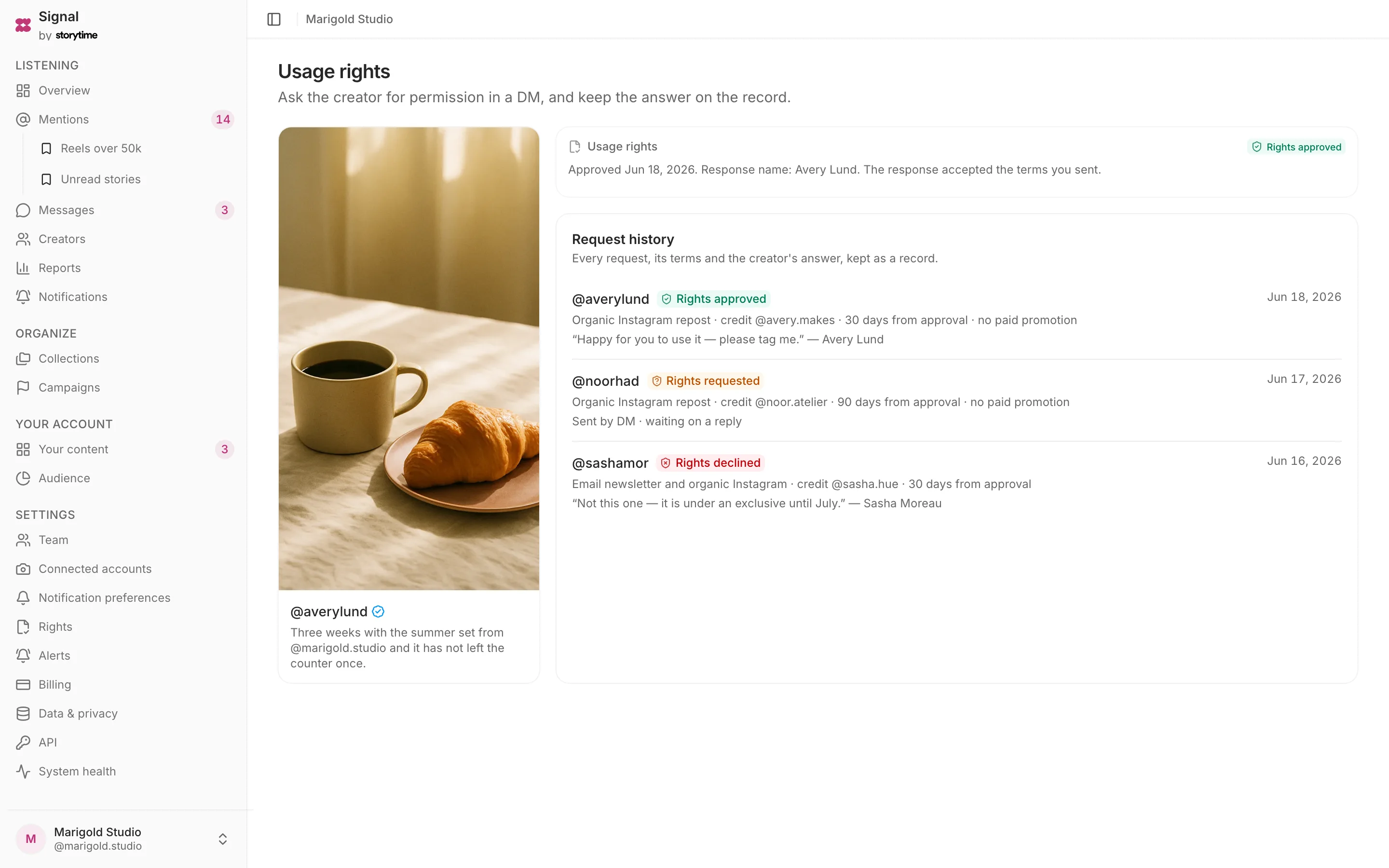
Start a request from the post. The creator receives a link showing the proposed terms and can approve or decline. Signal stores the decision and the terms shown at that time.
Included on every plan, starting with Free — no card.
- Plan
- Free
- Capabilities
- 5
- Area
- Rights
- Works with
- Mentions, Campaigns, Creators
What you can do
5 includedStart from the post
Review the message and proposed terms before sending the request.
Send or copy
Send the request as a DM, or copy the prepared message and send it another way.
Show the exact terms
The creator sees the post, requesting brand and full terms before choosing.
Preserve each decision
The request keeps the terms shown when the creator approved or declined.
Filter by rights status
Find posts with no request, a pending request, approval or decline.
How a request works
- Step 1
Review the request
Check the message and terms from the post.
- Step 2
Send the link
Signal sends the DM, or hands you the prepared message to send yourself.
- Step 3
Creator decides
The creator approves or declines on the linked page.
- Step 4
Keep the record
The post shows the decision, timestamp and terms that were presented.
Plan
Free
The whole listening loop for one account, forever free.
Free. The comparison table shows 25 current features and limits across all plans.